One family, compatible projects. Data from the other editions is preserved when you switch, even when that edition does not display it.
ArrowCrab AI Dive Studio Story
From the dive log to the story you share.
Follow the workflow through real Belize dive records and Roatan photographs. Eight original screen captures show how ArrowCrab AI Dive Studio connects the places, moments and discoveries you bring back.
CHAPTER 01
Every adventure has a home.
Start with the places you have been. The Studio dashboard brings Belize, Roatan and Curaçao into one view, pairing trip memories with dive counts, time underwater and photo inventories. Your log and your images belong to the same story.
THE WHOLE PROJECT, AT A GLANCEEnlarge ↗
CHAPTER 02
Find the dive behind the memory.
A trip becomes a series of individual dives. In the Belize log, compare sites, depths, durations and gas use, then follow the photo count to the encounters you recorded. Boca De Rio has 38 photos waiting to be explored. Studio and Diver also support multiple dive computers per dive, keeping primary and secondary computers linked to the same record.
BELIZE · FROM TRIP TO DIVEEnlarge ↗
CHAPTER 03
Put the moment back in context.
Open dive #329 at Boca De Rio: 55 minutes underwater, with a maximum depth of 66 feet. Photo markers sit alongside the estimated depth profile, connecting images to the dive. Review the record, browse its 38 photos, or start a slideshow from here.
BOCA DE RIO · 66 FT · 55 MINEnlarge ↗
CHAPTER 04
Turn an inventory into a collection.
Now move to the photographs. This Roatan inventory brings 357 ORF RAW images together, with dive associations visible on the thumbnails. Review what you captured and create a collection of the moments you want to keep and share.
ROATAN · ORGANIZE THE ENCOUNTERSEnlarge ↗
CHAPTER 05
Bring the color back into the story.
Underwater light leaves a strong blue-green cast. These three captures show the same Roatan photograph with Color Fix off, on, and off again. Compare the tank, skin tones and seabed, then use the viewer’s adjustment, crop and Save JPG tools to finish the image.
Select a capture to compare the actual app results. Color correction uses image processing; marine-life identification is a separate AI feature.
COLOR FIX OFF · ORIGINAL CAPTUREEnlarge ↗
CHAPTER 06
Let your dive log answer back.
“What are my three deepest dives, their duration and location?” Ask ArrowCrab AI looks up the project’s dives and returns the Blue Hole in Belize, a Curaçao deep dive and Newmans Wall in Roatan. A question turns years of records into a story you can revisit.
FROM THE AI RESPONSEBlue Hole, Belize
139 ft · 28 minutes · Dive #325
AI INSIGHT · GROUNDED IN YOUR PROJECTEnlarge ↗
Chapter 1 of 6 · Your trips
AND THEN, SHARE WHAT YOU SAW.
A labeled marine-life encounter. A color-corrected movie. A whole trip in a slideshow.
Original screenshots supplied by the creator, captured in the macOS app. The story moves between trips in the same project; the photo correction example is from Roatan and the dive detail is from Belize. Select any screen to see it at full size.
ArrowCrab AI Diver Story
Every dive recorded. Every trip remembered.
Follow six real screens through a dedicated dive log: from trip memories and individual records to gas analysis and charts you can explore. Ask ArrowCrab AI adds plain-language questions about your project.
CHAPTER 01
Every trip, part of your story.
Start with a view of your diving life. The dashboard brings trips to Roatan, Curaçao, Cozumel, Bonaire and Grand Cayman together with dive counts, time underwater and depth statistics. Open a trip to revisit the details.
YOUR ADVENTURES · ACTUAL APP SCREENEnlarge ↗
CHAPTER 02
Remember the places and the people.
Trip Details puts dates, accommodation, dive totals and personal notes into one table. Compare trips at a glance and keep the context that makes each journey memorable, from a birthday in Bonaire to a return to CoCoView.
TRIP DETAILS · ACTUAL APP SCREENEnlarge ↗
CHAPTER 03
Keep every descent connected.
Explore the individual dives behind a trip: site, depth, temperature, duration, gas mix and tank pressures. Diver supports multiple dive computers per dive, with primary and secondary computer fields on the same record. The supplied screen shows those fields alongside the Roatan dive log.
DIVE RECORDS · ACTUAL APP SCREENEnlarge ↗
CHAPTER 04
See the patterns in your gas use.
Review gas consumed per dive, consumption rates, starting and ending tank pressure, and surface air consumption (SAC) trends. Charts group recorded data by location and gas mix, making it easier to explore how your dives compare.
GAS ANALYSIS · ACTUAL APP SCREENEnlarge ↗
CHAPTER 05
Turn a log into a bigger picture.
Explore depth, duration, water temperature, dive locations and frequency across your history. Move from individual records to the patterns across trips, with chart tooltips that reconnect a data point to its dive.
YOUR DIVING IN CHARTS · ACTUAL APP SCREENEnlarge ↗
CHAPTER 06
Follow a point back to the dive.
Expand a chart for a closer view, then zoom and pan through the records. In this duration chart, the highlighted point is dive #227 in Bonaire on April 28, 2025: 69 minutes. The tooltip offers a route back to the dive details.
A CLOSER LOOK · ACTUAL APP SCREENEnlarge ↗
Chapter 1 of 6 · Your adventures
MORE TO DISCOVER IN YOUR LOG.
Revisit the journey. Ask ArrowCrab AI about your diving.
All six screenshots are original macOS app captures supplied by the creator. The numbers shown belong to this project. Select a screen to view it at full size.
ArrowCrab AI Photographer Story
A closer look. A story worth sharing.
Follow an underwater photograph from its collection to a finished image and an AI identification. These four original screenshots show the Photographer workflow, with your images at its heart.
CHAPTER 01
Give every encounter a home.
Start with your photographs. Belize, Curaçao and Roatan collections sit together in the Photographer dashboard, with dates and counts for JPG, RAW and video files. Open an existing collection or use Quick Edit to begin with a single image.
ORGANIZE · PHOTOS, RAW FILES AND VIDEOEnlarge ↗
CHAPTER 02
Find the frames that tell the story.
Open the Roatan inventory and browse the trip in thumbnails. Original ORF files, corrected JPGs and edited videos appear together, so you can review the material and build a collection around the encounters you want to share.
ROATAN · FROM INVENTORY TO COLLECTIONEnlarge ↗
CHAPTER 03
Make the details easier to see.
Open a photograph and switch on Color Fix to correct its underwater color cast. Then fine-tune brightness, exposure, sharpness, saturation and hue with the adjustment controls. Crop the composition and save a JPG when the image is ready.
Color correction is image processing. AI marine-life identification adds information about what you photographed.
COLOR CORRECTION · YOUR FINISHING TOUCHESEnlarge ↗
CHAPTER 04
Add understanding to the encounter.
Use Identify Marine Life to ask AI about the photograph. In this example, the response suggests a pipefish in the family Syngnathidae and describes its features. Review the suggestion, save the result, or use Overlay Photo to put the identification on an image you can share.
FROM THE AI RESPONSESuggested ID: Pipefish
Family Syngnathidae · Review before sharing
AI DISCOVERY · REVIEW, SAVE AND SHAREEnlarge ↗
Chapter 1 of 4 · Your collections
THE IMAGE IS ONLY THE BEGINNING.
Restore the color. Discover the subject. Share the encounter.
All four screenshots are original captures from the macOS Photographer app. AI identifications are suggestions to review; the response shown here is preserved exactly in the screenshot.
05 / FROM THE APPS TO THE WORLD
The encounter. The finished story.
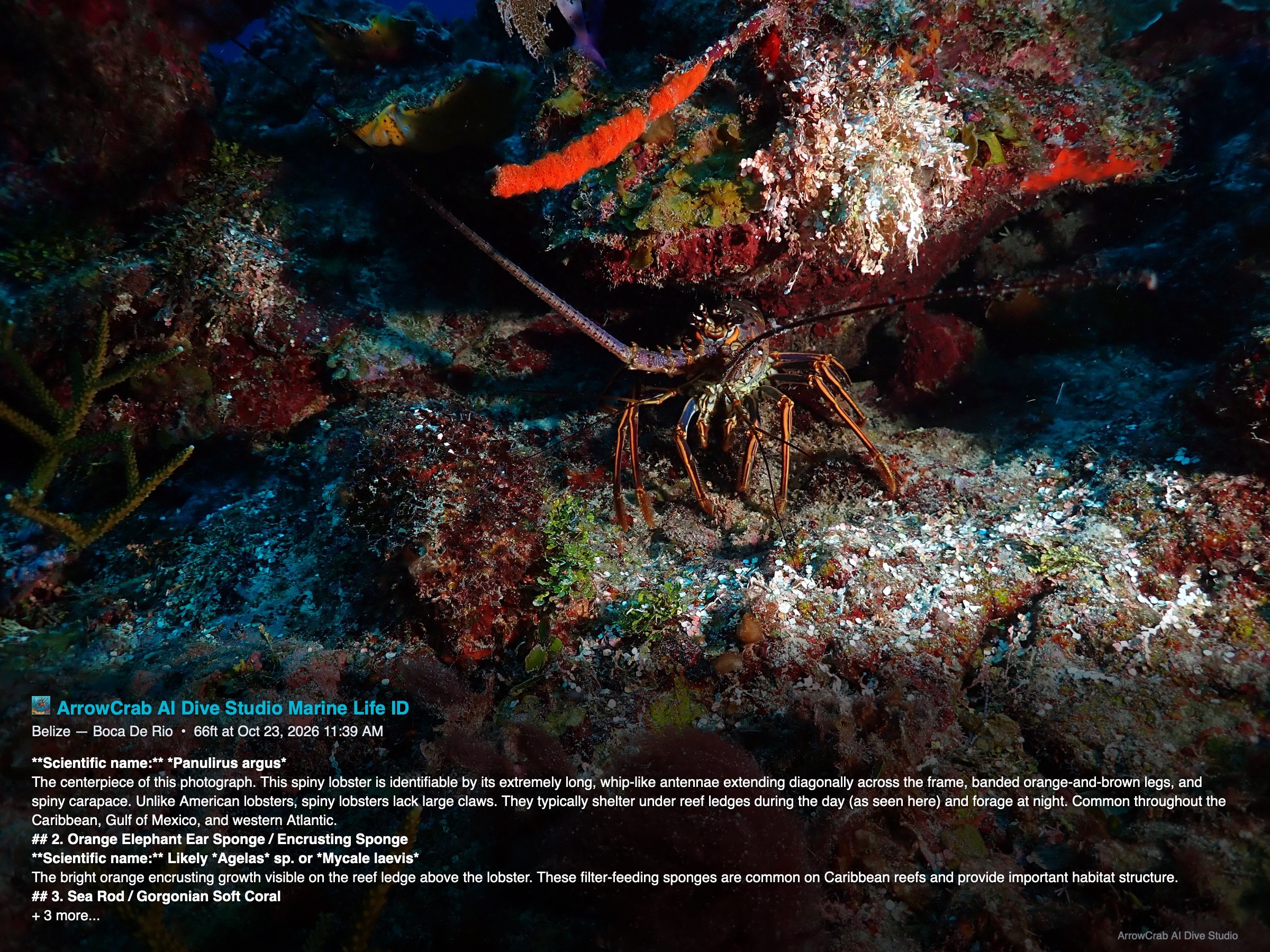
Three published examples from ArrowCrab AI: a marine-life ID image, an underwater movie, and the Belize 26 slideshow. The ID image and Night Hunters movie were color corrected before publication.
AI MARINE-LIFE IDCOLOR CORRECTED
An encounter, identified.
A finished marine-life ID image from Belize, with the app’s identification text, dive context and ArrowCrab branding published directly on the photo.
Underwater color correction was applied before the identification overlay was published. Open the image to read the original AI-generated details.
These are finished examples supplied by the creator. The original marine-ID overlay is preserved. Night Hunters has been optimized for web playback with its audio retained. The Belize 26 slideshow retains its original video quality.
02 / INTELLIGENCE WITH CONTEXT
A little more insight. A lot more discovery.
ArrowCrab connects AI to your own project. Choose Anthropic or OpenAI and bring your own API key.
01 — ASK ARROWCRAB AI
Your log has answers. Just ask.
Explore trips, dives, buddies and saved project information through a conversation. Ask ArrowCrab AI reads project data to answer questions, with follow-ups in the same chat.
EXAMPLE QUESTIONS
“Which trip had the most dives?”
“Who did I dive with in Bonaire?”
“Summarize my 2025 diving.”
Studio · Diver · Photographer Chat follows the data in your project.
02 — AI MARINE-LIFE IDENTIFICATION
From “what was that?” to a closer understanding.
Use vision AI on an underwater photograph to suggest marine-life identifications. Save common and scientific names with context, revisit results, and add an identification overlay to a photo copy.
01
Choose a photoOr identify a named collection in a batch.
02
Discover the detailsReview suggested species and descriptions.
03
Keep the encounterSave results and create a labeled image.
Studio · PhotographerAI identifications are suggestions to review.
YOUR CHOICE OF PROVIDER
AI features need an internet connection and your own provider API key; provider charges may apply. Relevant project data or selected images are sent for AI requests. Color correction uses image-processing tools and does not require AI identification.
06 / SIDE BY SIDE
Choose what you want to bring back.
Studio brings both worlds together. Diver and Photographer keep the same core tools focused on your interests.
ArrowCrab edition capabilities
Capability
Dive Studio
Diver
Photographer
Ask ArrowCrab AI Chat about your current project
✓
✓
✓
AI marine-life identification Single photo, batch and saved results
✓
—
✓
Dive imports & manual logging
✓
✓
—
Trips, buddies & dive computers
✓
✓
—
Multiple dive computers per dive Primary and secondary computers on one record
✓
✓
—
Depth, duration & gas analytics
✓
✓
—
Photo & video collections
✓
—
✓
Underwater photo color correction
✓
—
✓
Photo-to-dive matching
✓
—
—
Slideshows & video tools Export options vary by platform
✓
—
✓
Local project files
✓
✓
✓
07 / WHERE YOU EXPLORE
At the desk. Back on the boat.
Desktop tools for the full workflow. An iPhone app for your mobile kit. Here is how the platforms compare.
⌘
Mac
Desktop builds
All three editions. Work with local folders, RAW images and project files. Studio and Diver support Bluetooth and USB dive-computer imports.
Studio & Photographer: photo correction, slideshows and desktop video processing.
All three edition targets are included. Import photos from the Photos library, open projects through Files, use AI chat and identify marine life.
Bluetooth dive imports; photo color correction. Video color correction and MP4 slideshow export are not yet available on iOS.
◉
Android (Droid)
Available
ArrowCrab AI is available on Android. Bring the ArrowCrab family along on your Android device.
Contact [email protected] for Android availability details and installation information.
Android availability has been confirmed by the creator. Contact ArrowCrab AI for current platform and installation information.
A FEW GOOD QUESTIONS
Before your next dive.
Which edition should I choose?+
Choose AI Dive Studio for a combined dive log and photography workflow. Choose Diver if you want dive imports, trip records, analytics and log chat. Choose Photographer for image collections, editing and AI marine-life identification.
Does everything need an internet connection?+
Your projects are stored locally. AI chat and marine-life identification need an internet connection and a configured Anthropic or OpenAI API key. You can also save project files in your own cloud-drive folder.
Can I use my existing dive logs?+
Studio and Diver support Shearwater database imports, FIT and UDDF files, manual dive entry, and downloads from supported dive computers. Connection methods and device compatibility depend on the platform and computer model.
Can I use multiple dive computers on one dive?+
Yes. ArrowCrab AI Dive Studio and Diver support multiple dive computers per dive. Link a primary and a secondary computer to the same dive record so both remain connected to that dive.
Can I switch editions later?+
Yes. The editions share compatible project data. Diver preserves photo data without displaying it, and Photographer preserves dive data without displaying it. Studio shows both.
Can AI plan a dive for me?+
Ask ArrowCrab AI helps you explore your recorded project data. It is not a dive planner and does not provide decompression, gas-planning or medical advice.
 THE COMPLETE EXPERIENCE